
Leveraging intelligent automation to capture opportunities competitors miss—without advertising budgets or expensive SEO services
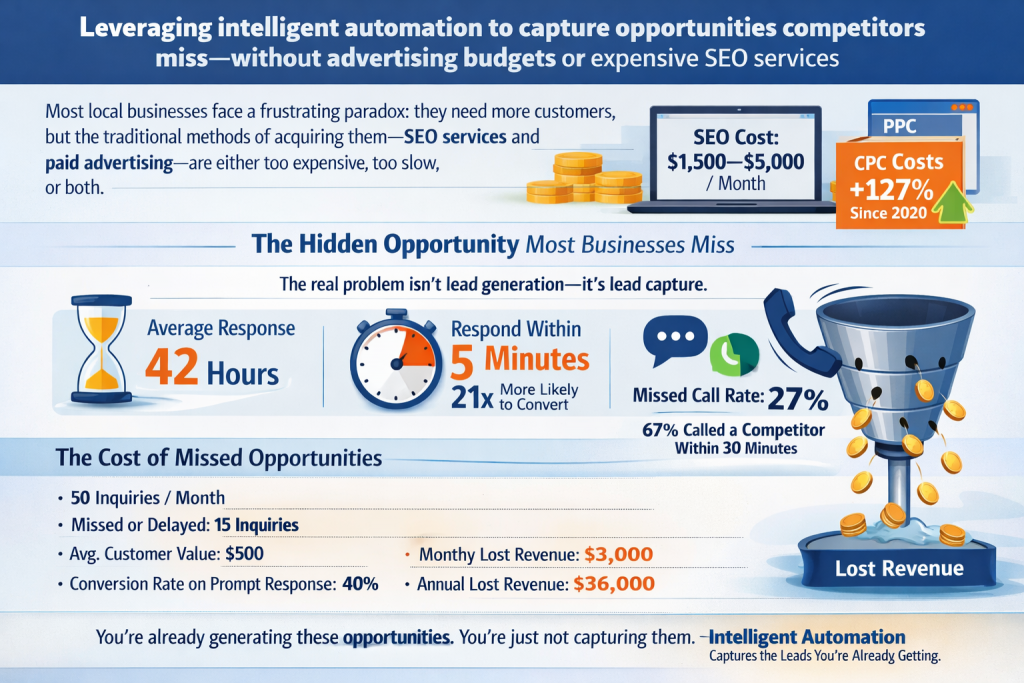
Most local businesses face a frustrating paradox: they need more customers, but the traditional methods of acquiring them—SEO services and paid advertising—are either too expensive, too slow, or both.
SEO agencies promise results in 6-12 months and charge $1,500-5,000 monthly. According to WordStream’s 2025 PPC Benchmark Report, average cost-per-click has increased 127% since 2020, making paid advertising unsustainable for many local businesses operating on tight margins.
But here’s what most businesses don’t realize: there’s a third path that doesn’t require ongoing SEO expenses or advertising budgets. It’s not a shortcut or a hack—it’s a systematic approach to capturing opportunities you’re already generating but currently losing.
Let me show you how intelligent automation can generate consistent appointments without spending on SEO or ads.
The Hidden Opportunity Most Businesses Miss
Before we discuss automation, you need to understand where the real opportunity lies.
Most local businesses focus on generating more leads—more traffic, more inquiries, more visibility. But research shows the bigger problem isn’t lead generation—it’s lead capture.
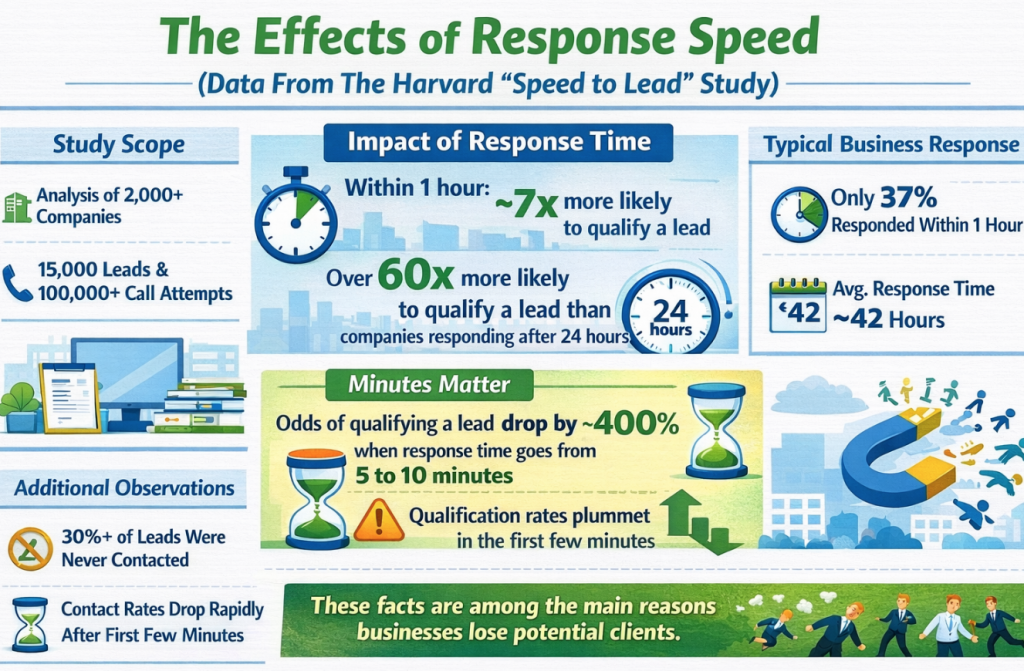
According to Velocify’s analysis of 2.1 million sales leads, the average business response time is 42 hours. But InsideSales.com’s research analyzing 1.25 million leads found that leads responded to within 5 minutes are 21 times more likely to convert than those waiting 30 minutes, and 100 times more likely than those waiting an hour.
This builds a massive gap between leads generated and leads captured.
Harvard Business Review’s research found that 35-50% of sales go to the vendor that responds first. Yet CallRail’s analysis of 50 million phone calls to local businesses found that the average missed call rate is 27%, with 67% of missed callers contacting a competitor within 30 minutes.
Let’s put numbers to this:
Assume your business receives 50 inquiries per month (below average for businesses with decent visibility):
- Missed or delayed responses: 15 inquiries (30%)
- Average customer value: $500
- Conversion rate on prompt responses: 40%
- Monthly lost revenue: $3,000
- Annual lost revenue: $36,000
You’re already generating these opportunities. You’re just not capturing them.
This is the opportunity automation addresses—not generating new leads, but capturing the ones you already have.
Why You’re Losing Opportunities Right Now
Let’s walk through what’s happening in your business on a typical day:
9:30 AM: You’re with a customer, providing excellent service. Your phone rings. You can’t answer—you’re focused on the customer in front of you. The call goes to voicemail.
11:15 AM: Someone fills out the contact form on your website. The form submission sits in your email inbox. You’re still with customers, moving between appointments.
2:45 PM: Another call comes in while you’re driving to your next job. You make a mental note to call back when you arrive.
4:20 PM: A text message arrives asking about your services and availability. You’re in the middle of work and don’t see it immediately.
6:30 PM: You finally get back to your phone. You see the missed call from this morning, the form submission from midday, and the afternoon text. You start returning calls and messages.
But here’s what happened while you were working:
The morning caller contacted three other businesses. Two responded within minutes via automated text. They booked with the first one who confirmed availability.
The website form submission received instant responses from your competitors. By the time you reply seven hours later, they’ve already scheduled with someone else.
The afternoon text went unanswered long enough that the person assumed you weren’t interested or available. They moved on.
This isn’t hypothetical. This is happening in your business every single day.
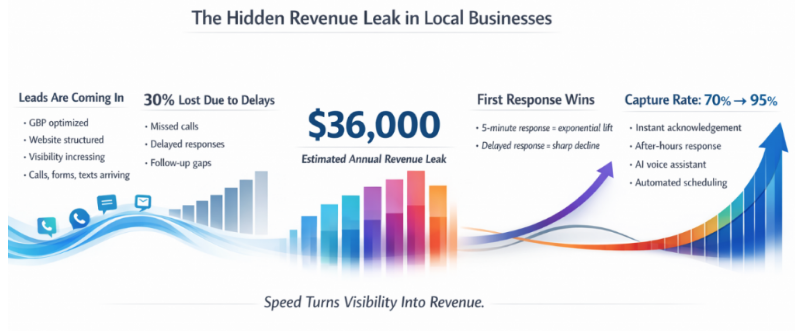
And the frustrating part? You’re doing exactly what you should be doing—serving your existing customers. The problem isn’t that you’re unavailable. The problem is that you don’t have systems to bridge the gap between inquiry and response.
The Cost of Manual Response
Let’s quantify what this costs you.
A case study from CallRail documented a home services company:
Monthly inquiries: 73 Missed or delayed responses: 22 (30%) Average job value: $850 Estimated conversion rate if responded promptly: 45%
Calculation:
- 22 lost opportunities × 45% conversion = 9.9 lost customers
- 9.9 lost customers × $850 = $8,415 monthly lost revenue
- Annual lost revenue: $100,980
For a business with higher transaction values or better conversion rates, the numbers are significantly larger. 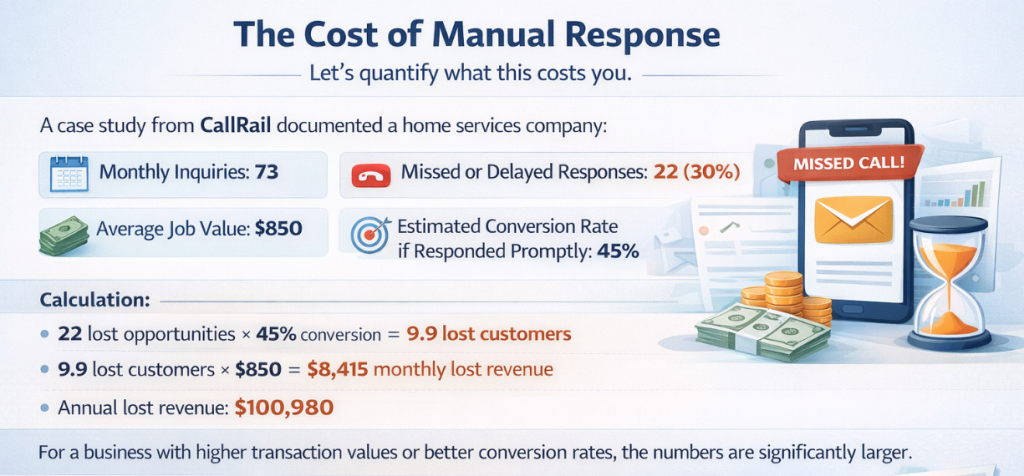
According to Marketing Metrics, the probability of converting a lead decreases by 80% if you wait 24 hours to respond, and by 90% if you wait 48 hours.
You’re paying for marketing that generates these inquiries—through your Google Business Profile optimization, your website, your visibility efforts. The leads are there. You’re just not capturing them effectively.
What Automation Actually Solves
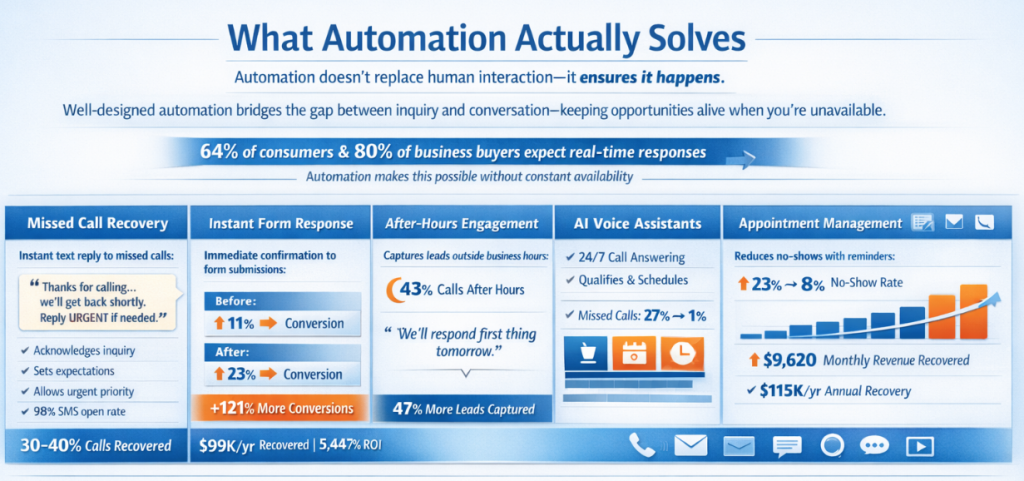
When most people hear “automation,” they think of impersonal, robotic interactions that damage customer relationships. But effective automation isn’t about replacing human interaction—it’s about ensuring human interaction can happen.
Well-designed automation serves as a bridge between inquiry and conversation. It keeps opportunities alive during the critical window when you’re unavailable, so you can follow up personally when you are available.
According to Salesforce’s State of the Connected Customer report, 64% of consumers and 80% of business buyers expect companies to respond to and interact with them in real-time. Automation makes this possible without requiring you to be chained to your phone.
Here’s what proper automation accomplishes:
Component #1: Missed Call Recovery
When you can’t answer a call, an automated system immediately sends a text message to that number:
“Thanks for calling [Business Name]. We’re with a customer right now but received your call. We’ll get back to you within [timeframe]. If this is urgent, reply URGENT and we’ll prioritize your call.”
This simple message accomplishes several critical things:
- Confirms their call was received (they’re not wondering if they dialed correctly)
- Sets expectations for response time
- Keeps your business top-of-mind
- Provides a path for truly urgent situations
- Demonstrates professionalism and responsiveness
Why this matters:
According to SimpleTexting’s research:
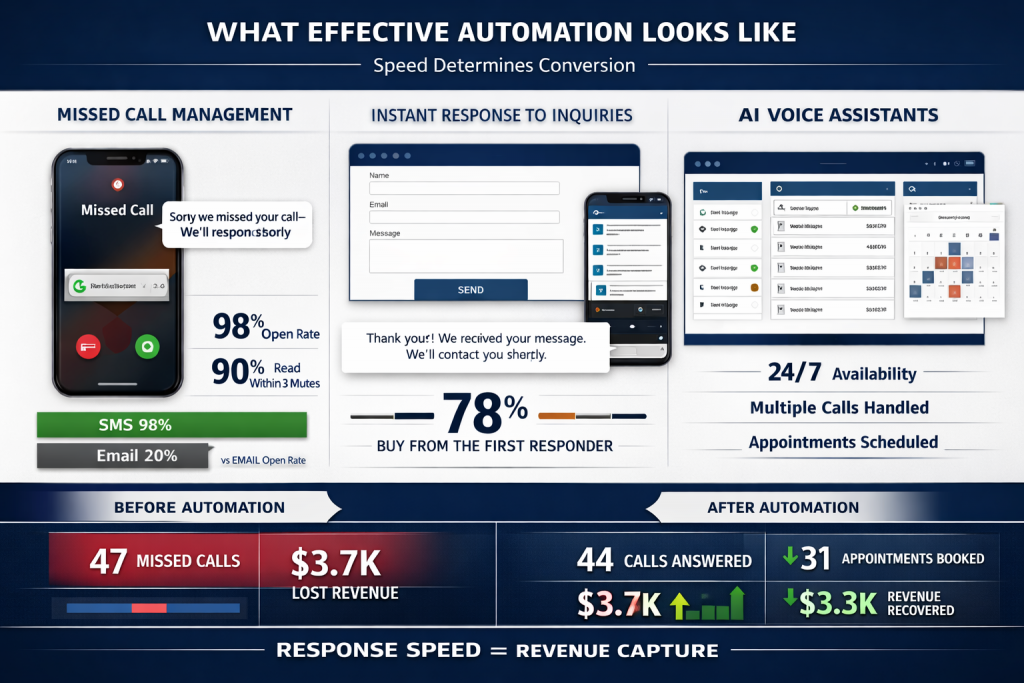
- SMS open rate: 98% (compared to 20% for email)
- SMS response rate: 45% (compared to 6% for email)
- Average time to read an SMS: 90 seconds
- Average time to read an email: 90 minutes
The person who called now knows you’re legitimate, you’re busy (which suggests you’re good at what you do), and you’ll respond. They’re far less likely to immediately call your competitor.
Research from Podium found that businesses using missed call text-back systems recover 30-40% of opportunities that would otherwise be lost.
Implementing effective automation requires understanding your specific business needs and choosing the right tools and approaches. If you have questions about what automation might look like for your business, or if you’d like someone to implement a complete automation system for you, send me a message. I work with local businesses to either guide the implementation process or handle everything on your behalf—whatever makes sense for your situation.
Real-world impact:
A case study from CallRail documented a plumbing company in Phoenix:
Before missed call text-back:
- Missed calls per week: 47
- Estimated lost opportunities: 14 (30%)
- Estimated lost revenue per week: $3,760
After implementing missed call text-back:
- Missed calls per week: 47 (same)
- Recovered through text-back: 18 (38%)
- Lost opportunities reduced to: 9
- Estimated recovered revenue per week: $1,920
- Annual recovered revenue: $99,840
System cost: $150/month ($1,800 annually) Net annual benefit: $98,040 ROI: 5,447%
Component #2: Instant Form Response
When someone submits a contact form on your website, they should receive an immediate automated response confirming receipt and outlining next steps.
Without this, they’re left wondering:
- Did the form work?
- Will anyone respond?
- Should I contact other businesses too?
With immediate automated response, they know their inquiry was received and when to expect follow-up. This buys you time to respond personally without losing the opportunity.
According to Drift’s 2025 Lead Response Report, companies that respond to leads within 5 minutes are 100 times more likely to connect with and qualify the lead than those that respond after 30 minutes.
A case study from HubSpot:
Before automated form responses:
- Form submissions: 127 per month
- Average response time: 6.3 hours
- Conversion rate: 11%
- Monthly conversions: 14
After automated form responses:
- Form submissions: 134 per month
- Automated instant response + personal follow-up within 2 hours
- Conversion rate: 23%
- Monthly conversions: 31
Result: 121% increase in conversions with minimal additional traffic—simply by implementing instant automated confirmation.

Component #3: After-Hours Engagement
Many inquiries come outside standard business hours—evenings, weekends, even late at night when someone realizes they need a service.
According to CallRail’s data:
- 43% of calls to local businesses occur outside 9 AM – 5 PM
- 28% of website form submissions occur between 6 PM and 8 AM
- Weekend inquiries account for 31% of total weekly inquiries
Without automation, these inquiries sit unacknowledged until you return to work. By then, the person has often already booked with a competitor who responded immediately via automation.
Automated after-hours response keeps these opportunities alive:
“Thanks for contacting us. We’ve received your message and will respond first thing tomorrow morning. Our business hours are [hours]. If you need immediate assistance, call [emergency number].”
A study by Ruby Receptionists found that businesses with after-hours response systems capture 47% more leads than those without.
Component #4: AI Voice Assistants
One of the most powerful automation tools now available to local businesses is AI voice assistants—systems that can actually answer phone calls and have natural conversations with callers.
This technology has advanced dramatically. According to Gartner, by 2027, 25% of employee interactions with applications will be via voice, up from less than 5% in 2023.

Modern AI voice assistants can:
- Answer calls 24/7, including after hours and weekends
- Handle multiple calls simultaneously (eliminating busy signals)
- Answer common questions about services, pricing, and availability
- Qualify leads by asking relevant questions
- Schedule appointments directly into your calendar
- Transfer urgent calls to you when necessary
- Provide consistent, professional responses every time
The key advantage: these systems never miss a call. They don’t get tired. They don’t take breaks. They don’t forget to follow up.
For local businesses, this solves one of the biggest operational challenges: being available when customers need you without hiring additional staff or being constantly tethered to your phone.
Real-world impact:
A comprehensive case study from CallRail documented a plumbing business in Phoenix that implemented an AI voice assistant:
Before AI assistant:
- Total monthly calls: 247
- Missed calls: 67 (27%)
- Calls answered but not converted: 89
- Appointments scheduled: 91
- Estimated monthly lost opportunities: 47
- Estimated monthly lost revenue: $4,730
After 6 months with AI assistant:
- Total monthly calls: 289 (increased due to better reputation)
- Missed calls: 3 (1%)
- Calls handled by AI: 198
- Calls transferred to owner: 91
- Appointments scheduled: 167 (83% increase)
- Capture rate: Increased from 70% to 95%
- Monthly revenue increase: $6,890
- System cost: $350/month
- ROI: 1,968%
The system paid for itself in the first month and continues generating additional revenue every month thereafter.
Another case study from Conversica documented a dental practice:
Before AI assistant:
- Monthly inquiries: 156
- Appointments scheduled: 47
- Conversion rate: 30%
After AI assistant:
- Monthly inquiries: 178 (reputation improved, leading to more inquiries)
- Appointments scheduled: 121
- Conversion rate: 68%
- Revenue increase: $28,400 monthly

Component #5: Appointment Management
Another significant automation benefit is appointment management—confirmations, reminders, and rescheduling.
No-shows and last-minute cancellations cost local businesses substantial revenue. When someone doesn’t show up for a scheduled appointment, you’ve lost that time slot, the revenue it would have generated, and the opportunity to serve another customer.
According to research from Acuity Scheduling:
- Average no-show rate without reminders: 23%
- Average no-show rate with automated reminders: 8%
- Average cost per no-show for service businesses: $150-400
Automated appointment management reduces no-shows through:
Immediate confirmation: When an appointment is booked, automated confirmation is sent via text and email with all relevant details.
Advance reminders: 24-48 hours before the appointment, automated reminder with option to confirm, reschedule, or cancel.
Day-of reminder: Morning reminder on the appointment day with directions and contact information.
Easy rescheduling: If someone needs to reschedule, they can do so through the automated system without playing phone tag.
Studies from multiple sources confirm the impact:
- Solutionreach: Automated appointment reminders reduce no-shows by 38%
- Weave: Two-way text reminders reduce no-shows by 42%
- SimplePractice: Automated reminders reduce no-shows by 30-50%
A case study from Weave:
Dental practice with 400 monthly appointments:
Before automated reminders:
- No-show rate: 22%
- Monthly no-shows: 88 appointments
- Average appointment value: $185
- Monthly lost revenue: $16,280
- Annual lost revenue: $195,360
After automated reminders:
- No-show rate: 9%
- Monthly no-shows: 36 appointments
- Recovered appointments: 52 per month
- Monthly recovered revenue: $9,620
- Annual recovered revenue: $115,440
- System cost: $150/month ($1,800 annually)
- Net annual benefit: $113,640
Component #6: Review Generation
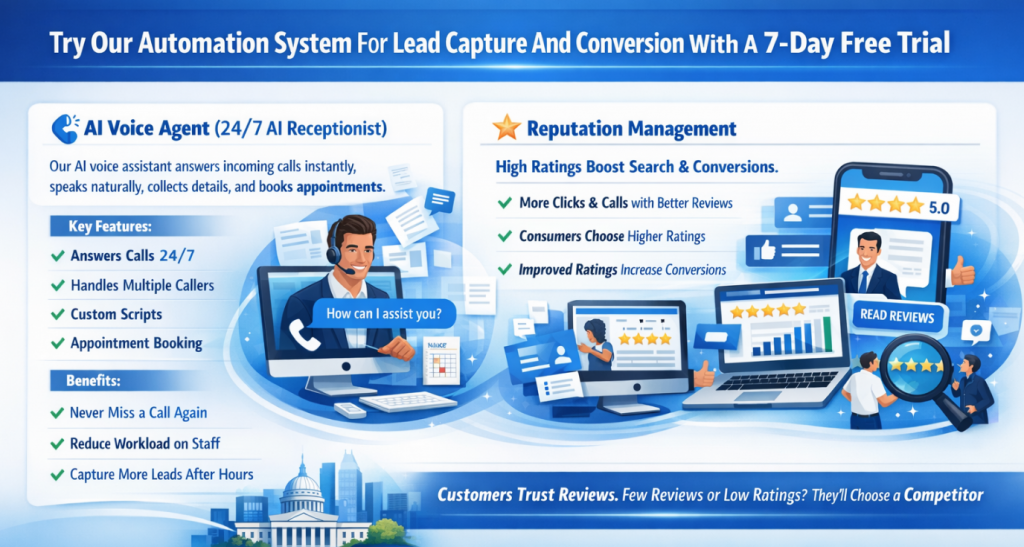
We’ve discussed in previous articles how critical reviews are for local visibility and conversion. More reviews and higher ratings lead to better map pack rankings and higher conversion rates.
According to BrightLocal’s 2025 Consumer Review Survey:
- 98% of consumers read online reviews for local businesses
- 76% trust online reviews as much as personal recommendations
- 49% need at least a 4-star rating before considering a business
But asking for reviews manually is inconsistent. You remember to ask some customers. You forget with others. You feel awkward asking. Some customers say they’ll leave a review but never do.
Research from Womply found that businesses using manual review requests generate an average of 1.3 reviews per month, while businesses using automated systems generate 11.7 reviews per month—a 900% increase .
Automation solves this by making review requests systematic:
Timing: After a job is completed, the system waits an optimal period (usually 24-48 hours) then sends a review request.
Research from Womply analyzing 10 million review requests found that requests sent 24-48 hours after service completion have a 73% higher completion rate than requests sent immediately or more than one week later.
Personalization: The request includes the customer’s name, references the specific service provided, and thanks them for their business.
Easy process: The message includes a direct link to your review platform, making it as easy as possible for customers to leave feedback.
Follow-up: If no review is received, a gentle follow-up reminder is sent after several days.
Data from Podium shows that 69% of reviews come from follow-up messages, not the initial request.
A case study from Grade.us:
Law firm tracked over 12 months:
Before automated review generation:
- Total reviews: 18
- Average rating: 4.2 stars
- Monthly new reviews: 1.3
- Map pack position: #7
After 12 months of automated review generation:
- Total reviews: 142
- Average rating: 4.7 stars
- Monthly new reviews: 10.3
- Map pack position: #2
- Google profile views: Increased 247%
- Phone calls from Google: Increased 183%
- Estimated annual revenue increase: $287,000
Implementing effective automation requires understanding your specific business needs and choosing the right tools and approaches. If you have questions about what automation might look like for your business, or if you’d like someone to implement a complete automation system for you, send me a message. I work with local businesses to either guide the implementation process or handle everything on your behalf—whatever makes sense for your situation.
Component #7: Multi-Channel Communication Management
Modern customers contact businesses through multiple channels: phone calls, text messages, email, website forms, social media messages, and even chat widgets.
According to Salesforce’s State of the Connected Customer report:
- 75% of customers expect consistent experiences across multiple channels
- 73% are likely to switch brands if they don’t get it
- Average number of channels customers use to interact with businesses: 9
Managing all these channels manually is overwhelming. Messages get missed. Response times vary. Follow-up is inconsistent.
Automation platforms can centralize all these communication channels into a single interface, ensuring:
- No message is missed regardless of channel
- Response times are consistent across all channels
- Follow-up happens systematically
- You can manage all communications from one place
Research from Aberdeen Group found that companies with strong omnichannel customer engagement retain 89% of their customers, compared to 33% for companies with weak omnichannel engagement.
This centralization doesn’t just improve customer experience—it reduces your stress and cognitive load, allowing you to focus on service delivery rather than communication management.
The Complete ROI Picture
Let’s look at the comprehensive return on investment for automation systems using real data:
Typical automation system cost: $200-500 per month depending on features and business size
Value generated:
Missed call recovery: $2,000-5,000 per month
- Based on capturing 30-40% of opportunities that would otherwise be lost
- Harvard Business Review found companies contacting leads within an hour are 7x more likely to qualify them
No-show reduction: $500-1,500 per month
- Based on recovering appointments that would otherwise be missed
- Acuity Scheduling found automated reminders reduce no-shows by 30-50%
Review generation impact: $1,000+ per month
- Difficult to quantify directly, but improved review profile leads to better rankings and higher conversion
- Moz found review signals account for 15% of local pack rankings
- Spiegel Research Center found displaying reviews increases conversion by 270%
Time savings: $200-500 per month
- 5-10 hours per month in administrative tasks
Total monthly value: $3,700-8,000
Net monthly benefit after system cost: $3,200-7,500
A comprehensive study by Nucleus Research analyzing ROI across multiple automation implementations found an average return of $8.71 for every dollar spent on automation.
A real-world case study from Podium:
Multi-location auto repair chain (5 locations):
Investment: $450/month per location = $2,250/month total
Results after 6 months:
- Missed call recovery: $18,400/month
- No-show reduction: $6,700/month
- Review generation impact: $12,300/month (estimated from improved rankings and conversion)
- Time savings: $3,200/month
- Total monthly value: $40,600
- Net monthly benefit: $38,350
- ROI: 1,704%
Implementation Strategy
If you’re ready to implement automation to generate consistent appointments without SEO or advertising expenses, here’s the strategic approach:
Step 1: Identify Your Biggest Leak
Where are you losing the most opportunities?
- Missed calls during business hours?
- After-hours inquiries going unanswered?
- Delayed responses to form submissions?
- High no-show rates?
- Inconsistent review generation?
Start by automating the area causing the most lost revenue.
Step 2: Choose Integrated Systems
Your automation should integrate with your existing tools:
- Calendar/scheduling system
- Website
- Phone system
- CRM (if you have one)
Disconnected systems generate more problems than they solve. Look for platforms that centralize communication and integrate with your workflow.
Popular options include:
- Podium
- Birdeye
- CallRail
- Weave
- ServiceTitan (for home services)
- Or custom automation through Zapier/Make connecting your existing systems
Step 3: Customize for Your Business
Generic automated messages feel generic. Customize the language, timing, and approach to match your brand and customer expectations.
For example, a law firm’s automated messages should sound more formal than a landscaping company’s messages. A dental practice might emphasize comfort and care, while an HVAC company might emphasize urgency and availability.
Step 4: Monitor and Refine
Track how your automation is performing:
- Are response rates improving?
- Are customers satisfied with the experience?
- Are conversion rates increasing?
- Are no-shows decreasing?
- Are reviews increasing?
Adjust based on results. Automation isn’t “set it and forget it”—it’s “set it and optimize it.”
Step 5: Maintain Human Oversight
Automation should handle routine tasks, but you should remain involved in relationship building and complex situations.
Review scheduled appointments. Handle unusual requests personally. Follow up on high-value opportunities. Use automation to free up time for the work that truly requires your expertise.
Common Concerns Addressed
“Won’t automation make my business feel impersonal?”
Properly implemented automation does the opposite. It ensures every customer receives timely, professional communication. The alternative—delayed responses or no response—feels far more impersonal.
Research from Salesforce found that 64% of customers expect real-time responses, and 80% say the experience a company provides is as important as its products or services.
Automation handles the administrative acknowledgment. You handle the personal relationship building.
“What if the system makes mistakes?”
Modern automation systems are highly reliable, but they should always include human oversight. You review scheduled appointments. You handle complex situations. The system manages routine communications.
According to Gartner, AI systems in customer service achieve 85-90% accuracy rates, with human oversight handling edge cases.
“Will customers know they’re interacting with automation?”
For text-based automation, customers generally don’t know or care—they just appreciate the quick response.
Research from Drift found that 69% of consumers prefer chatbots for quick communication with brands, and 87% would use a bot if it saved them time.
For AI voice assistants, some systems identify themselves as AI, others sound completely natural. Either way, customers primarily care about getting their questions answered and their needs met.
“Is this too expensive for a small business?”
Given the revenue recovery and time savings, automation systems typically pay for themselves many times over.
According to McKinsey research, automation can reduce operational costs by 20-35% while improving customer satisfaction scores by 10-20%.
The question isn’t whether you can afford automation—it’s whether you can afford to keep losing opportunities to competitors who have implemented it.
The Competitive Reality
Here’s the uncomfortable truth: your competitors are implementing these systems.
According to Salesforce’s State of Marketing report, 67% of marketing leaders currently use marketing automation platforms, up from 51% in 2020.
The businesses that respond instantly, follow up consistently, and make the process easy are capturing the opportunities you’re missing.
This isn’t about being high-tech for the sake of it. It’s about meeting modern customer expectations and capturing the revenue you’re already paying to generate through your existing visibility.

Research from PwC found that 73% of consumers point to customer experience as an important factor in their purchasing decisions, and 65% say a positive experience with a brand is more influential than great advertising.
The businesses thriving in local markets aren’t necessarily the ones with the best technical skills or the lowest prices. They’re the ones who make it easiest for customers to do business with them.
Automation is how you make it easy.
The Path Forward
You don’t need expensive SEO services or rising advertising costs to generate consistent appointments. You need to capture the opportunities you’re already generating but currently losing.
According to McKinsey, companies that excel at customer experience grow revenues 4-8% above their market.
The businesses that implement these systems now will have a significant advantage over those that wait. Every month you delay is another month of lost opportunities and revenue going to competitors who’ve already made this transition.
A final longitudinal study from Aberdeen Group tracking 500 businesses over 3 years found:
Businesses with comprehensive automation:
- Revenue growth: 53% higher than competitors
- Customer retention: 47% higher
- Profit margins: 34% higher
- Customer satisfaction scores: 28% higher
Businesses without automation:
- Revenue growth: Below industry average
- Customer retention: 23% below industry average
- Profit margins: 18% below industry average
- Customer churn: 31% higher
The data is clear: automation isn’t just an advantage—it’s becoming essential for competitive survival and growth.
You’re already generating opportunities. Start capturing them.
Implementing effective automation requires understanding your specific business needs and choosing the right tools and approaches. If you have questions about what automation might look like for your business, or if you’d like someone to implement a complete automation system for you, send me a message. I work with local businesses to either guide the implementation process or handle everything on your behalf—whatever makes sense for your situation.